Essential Gear for Rack Operations: What’s Inside a Field Tech’s Bag?
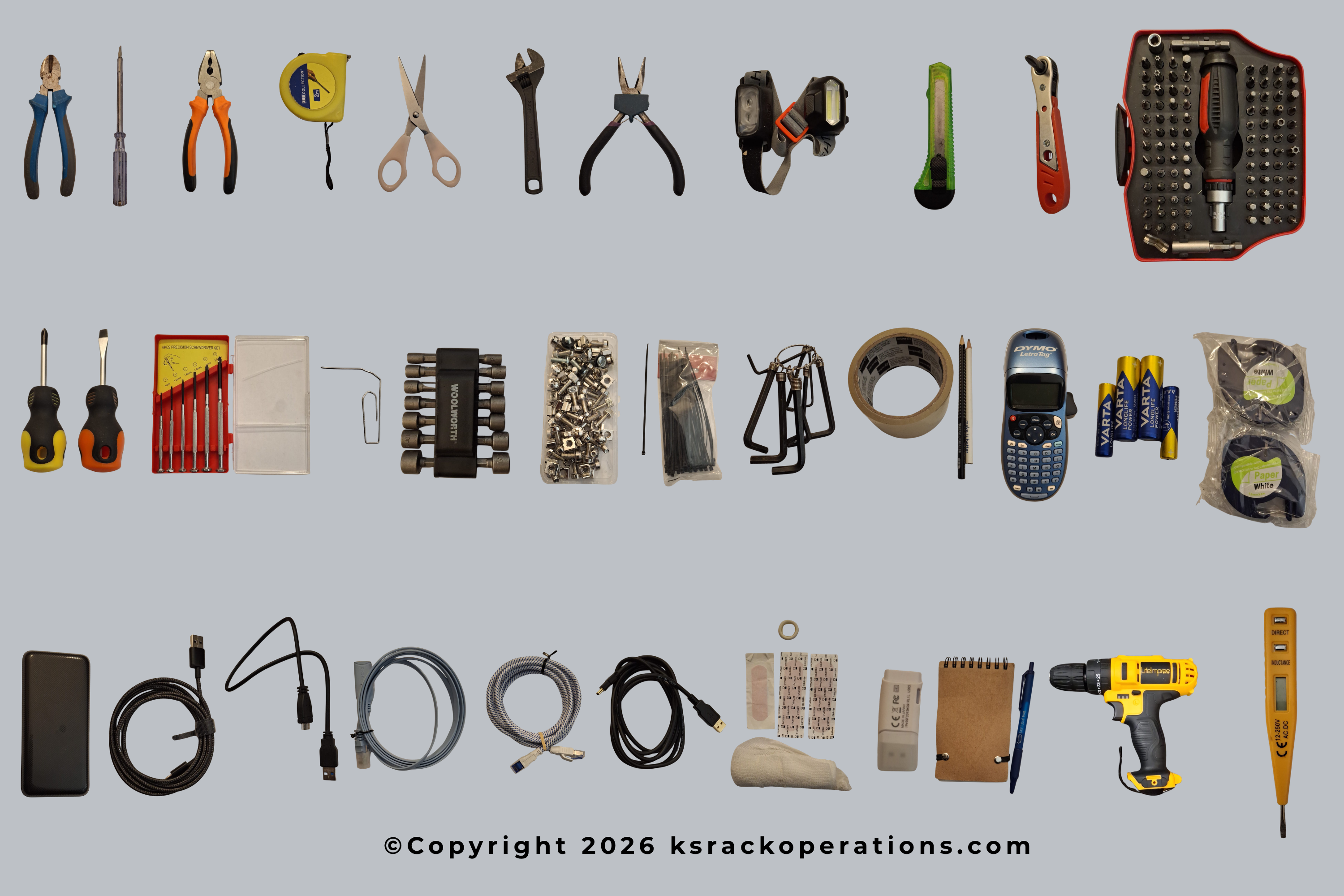
In our very first blog post, I wanted to kick things off by talking about the essential tools and hardware used in rack operations. The list I am about to share includes the absolute staples that every IT Field Support Technician should have in their backpack or tool kit before heading out to their first assignment. Of course, this doesn’t mean you will use every single tool on every job, nor does it mean this list covers every imaginable scenario. Depending on the scope of work, you may also need to procure specific patch cables, fiber optic patch cords, or SFP modules.
The absolute first step before any mission is to check the condition of your gear: verify that devices are functioning, ensure you have spares for consumable items like batteries, and double-check that your label printer has enough tape. This pre-check becomes even more critical if some time has passed since your last field assignment.
Here is the essential gear you should never leave behind:
1. Stationery Supplies
Simple items like pens, permanent markers, tape, and scissors are frequently used during Site Surveys for taking measurements, marking racks, labeling cables temporarily, or leaving notes for the next technician. Furthermore, jotting down critical details on-site makes it much easier to accurately transfer information to your work orders and final reports later on.
2. Headlamp (Hands-Free Lighting)
A high-quality headlamp is a lifesaver in the field. It keeps your hands free to work while directly illuminating wherever you look. This is especially crucial in data centers or server rooms where ambient ceiling light is often blocked by the racks themselves, leaving the inside of the cabinets pitch black.
3. USB, Console, and Network Cables
Having a variety of USB cables (with different connector types), console cables, and standard ethernet patch cords allows you to establish a direct connection between your laptop and the management port of a network device. This is how you bridge the gap and grant access to the remote engineering team configuring the system. While certain brands dominate the industry, you will encounter a mix of legacy and next-generation equipment from various vendors, each requiring different management interfaces.
Pro Tip: When choosing console cables or USB-to-Serial adapters, always opt for products with an FTDI chipset to avoid frustrating driver compatibility issues while on-site.
4. Voltage Tester (Non-Contact Voltage Detector / Multimeter)
In some deployment scenarios, field technicians are present during the initial setup phase of a rack, witnessing the very first cable runs. Though rare, you may need to verify whether power is actually reaching the cabinet or test if a specific PDU (Power Distribution Unit) outlet is live. Using a voltage tester to isolate whether a power issue lies within the PDU or the power cable itself is perfectly fine and legally compliant for an IT tech. However, keep in mind that any advanced electrical troubleshooting or wiring must be left entirely to certified electricians.
5. First Aid Kit
While not a technical tool, a complete first aid kit is an absolute must-have in any field tech's bag. Working inside tight rack environments frequently leads to minor cuts and scrapes on your fingers during mounting or unmounting. Having a few band-aids on hand ensures a minor scrape won't disrupt your workflow, allowing you to patch yourself up and get back to the task.
Crucial Addition: A massive chunk of these finger injuries occur while trying to snap cage nuts into the rack poles manually. To save your fingers, I highly recommend adding a dedicated Cage Nut Tool to your kit.
6. Power Bank and Extension Cable
Continuous communication with your remote teams (Remote Engineers, Project Managers, Team Leaders, or Clients) is expected in almost every scenario. Staying synced via platforms like MS Teams, Google Meet or Zoom is vital for a smooth workflow. To keep your laptop and mobile devices from dying in the middle of a migration, always carry a high-capacity power bank and a solid extension cable to bring power directly to your workspace if needed.
7. Mounting and Demontage Tools
Server racks are tight, confined workspaces. Using functional, compact tools will save you an immense amount of time. Short-handled or stubby flathead and Phillips screwdrivers are an ideal duo for tight spaces. Additionally, a simple Narrow-Handle Rotating Screwdriver can be an absolute lifesaver when working in awkward corners. Sometimes, removing the side panels of a rack isn't an option due to the physical layout of the room.
Furthermore, the screws securing the inner rails of certain network devices can have incredibly small heads; in these cases, precision screwdriver sets (like those used for watch repair) are incredibly useful. If you are doing a full, scratch-build installation where you need to mount 10 or more devices in a tight timeframe, a cordless screwdriver will save the day. Just ensure it is set to a low torque so you don't strip the screws or damage the equipment chassis.
8. Portable Storage Devices (USB / External SSD)
To save precious time during an active maintenance window, you might need to download firmware updates or OS images directly to your laptop or a flash drive. For these situations, carry a fast, high-capacity USB stick or a portable external SSD.
9. Extra Screws and Cage Nuts
In a perfect world, all devices arrive with their matching mounting kits. However, it’s not uncommon for distributor shipments to be missing hardware or include incompatible sizes. Instead of halting the project to reorder parts, carrying a backup set of M5 and M6 cage nuts and screws can completely save your deployment.
Real-World Example: On one assignment, the M6 cage nuts completely forgot to ship with the device. On another, the provided nuts were so rigidly manufactured that snapping them into the rack pole without breaking a thumb was impossible. Both times, having a stash of spare nuts in my bag saved the gig.
10. Label Printer
Knowing exactly which network cable runs from which device to which patch panel port is the foundation of structural cabling standards. If a site lacks proper labeling, troubleshooting a single down link forces you to trace cables by hand and eye—a total nightmare in a dense patch environment. To eliminate chaos before it starts, always adhere to strict labeling standards and keep your label printer juiced up and ready.
11. Socket Set, Allen Keys, and Adjustable Wrench
Expanding a rack or shifting the position of the rack poles (vertical rails) is sometimes necessary to get deep network appliances to sit flush. Readjusting these heavy-duty metal frames falls squarely on the field tech. To handle these mechanical adjustments, a small socket set, a metric Allen key set, and an adjustable wrench should always have a home in your tool bag.
12. Flush Cutters vs. Utility Knives
Flush cutters (or wire cutters) are incredibly useful, especially when dealing with older installations where cables were bundled tightly with plastic zip ties. Never use a utility knife (box cutter) to remove zip ties from network cables; it is incredibly easy to slice into the cable jacket. Save the utility knife strictly for opening cardboard boxes and unboxing hardware.
13. Velcro Tape and Zip Ties
In older infrastructure setups, you will see plastic zip ties used everywhere to tidy up cables. However, modern networking standards strongly advise against them because overtightening them crushes the internal twisted pairs, causing cross-talk and signal degradation. Instead, use plastic zip ties only as a temporary placeholder to hold bundles while you work. For the final dressing of the rack, always switch to Velcro tape (hook-and-loop fasteners) to ensure the cables can "breathe" without structural stress.
In this post, I’ve highlighted the foundational tools that keep a rack operation running smoothly from a field technician's perspective. In my own daily field deployments, these are the tools I rely on and check constantly. I hope this guide gives aspiring field techs a practical look at what it takes to succeed out in the field.